You’ve probably heard this line a lot if you’ve worked in IT infrastructure or software development:
“On my system, it functions properly, but not on the server.”
One of the primary causes of Docker’s rise in popularity in the DevOps community is this precise issue.
Docker makes it easier for developers and DevOps engineers to run applications consistently across all platforms, including laptops, testing servers, and production environments.
The Actual Issue Before Docker
Applications used to be installed straight onto servers.
Every setting was unique:
1.Systems of operation
2.Versions of the software
3.Dependencies and libraries
This is why transferring an application from development to production frequently resulted in failures. Teams spent more time resolving environmental problems than developing new features.
To clear up this misunderstanding, Docker was introduced.
What Is Docker, Then?
Docker is a platform for containerization that combines an application with all of its necessary components—code, libraries, dependencies, and configurations—into a single unit known as a container.
An application behaves consistently everywhere once it is inside a container.
Not a surprise. No last-minute mistakes.
A Docker Container: What Is It?
An application runs in a lightweight, isolated environment called a Docker container.
In contrast to virtual machines:
A complete operating system is not required for containers.
They get going more quickly.
They use fewer resources.
Because of this, Docker is incredibly effective for contemporary cloud and DevOps processes.
The Reasons DevOps Teams Choose Docker
Docker’s support for automation, speed, and consistency makes it a natural fit for DevOps procedures.
Teams use Docker for the following main reasons:
quicker deployment of applications
uniform settings for all teams
Simple application scaling
seamless incorporation into CI/CD pipelines
Improved use of resources
As a result, both large corporations and startups use Docker.
Docker in Practical Projects
In actual projects, Docker is frequently utilized to:
Web applications in packages
Execute microservices
Develop environments that are standardized.
Install apps on cloud computing platforms.
Use Kubernetes to orchestrate containers.
Docker is typically used in conjunction with cloud platforms, Jenkins, and Kubernetes.
Docker’s Career Importance
Docker is now regarded as an essential ability for:
- Devops
- Cloud
- Reliability
- Engineers for Platforms
Docker is listed as a fundamental requirement, not an elective, in the majority of DevOps job descriptions.
The DevOps ecosystem no longer views Docker as a “extra skill.” It is regarded as a fundamental necessity in many businesses. DevOps and cloud professionals are expected by recruiters today to have a thorough understanding of containerization, not just conceptually but also practically.
Containers become the standard packaging technique when businesses migrate their apps to the cloud. AWS, Azure, and Google Cloud are all widely used for container-based deployment.
Docker has high career value for the following reasons:
Microservices architecture is used in the majority of contemporary applications.
Containers are frequently used to deploy microservices.
Kubernetes is a popular orchestration tool that mainly uses containers.
Docker image builds are commonly used as part of automation in CI/CD pipelines.
It is much simpler to learn Kubernetes, cloud deployment, and sophisticated DevOps tools if one has a solid understanding of Docker.
During interviews, employers frequently inquire:
What distinguishes a container from a Docker image?
How does networking in Docker operate?
What is Dockerfile used for?
How can the size of a Docker image be decreased?
How can images be pushed to a private registry or Docker Hub?
This demonstrates the extent to which Docker is incorporated into actual job functions.
Comprehending the Docker Architecture
Knowing how Docker operates internally is essential to using it with confidence.
Docker is primarily made up of:
- The Docker Client
Users enter commands such as these in this command-line interface (CLI):
build – run – pull – Push
- Daemon Docker
In the background, the Docker daemon operates. It controls volumes, networks, images, and containers.
- Images of Docker
An application’s blueprint is a Docker image. It includes:
Code for an application
Execution time
Dependencies
Tools for systems
Images are templates that can only be read.
- Containers for Docker
Docker image instances are running in containers. An image turns into a container once it has run.
Beginners can avoid confusion when working in real environments by being aware of this structure.
Describe a Dockerfile.
Instructions for creating a Docker image are contained in a straightforward text file called a Dockerfile.
Developers write steps inside a Dockerfile rather than installing dependencies by hand each time. After that, Docker automatically complies with those directives.
A simple Dockerfile consists of:
The base image
Working directory
Making a file copy
Setting up dependencies
Making ports visible
Launching the program
Deployments become repeatable and predictable as a result.
Repeatability is crucial in the DevOps culture. Dockerfile makes sure that the application is built consistently by all users.
Docker Registries and Images
An image must be stored somewhere after it is created.
We refer to that location as a container registry.
Well-known registries consist of:
Docker Hub
Amazon ECR
Google Container Registry
Registry for Azure Containers
Images are automatically created and pushed to registries in CI/CD pipelines. Servers then pull and deploy the most recent image.
By eliminating manual steps, this workflow lowers the possibility of human error.
Microservices and Docker
Seldom are contemporary applications constructed as one big system. Rather, they are separated into microservices, which are smaller services.
Every microservice:
operates on their own
has a database of its own (in many cases)
Separate scaling is possible.
Microservices are practical thanks to Docker.
For instance:
One front-end container
One backend API container
One database container
One cache container
Although they can communicate with one another, each service operates independently.
One of the main reasons Docker became essential to contemporary DevOps was because of its versatility.
Virtual Machines vs. Docker
Virtual machines (VMs) and Docker containers are often confused by novices. Although they both offer isolation, their methods differ.
Virtual Computers:
Add the entire operating system.
Large and weighty
Reduced startup time
Use more memory.
Docker Containers:
kernel of the shared host OS
Not heavy
In just a few seconds, begin
Reduce the amount of resources you use.
Businesses can run multiple containers on a single server due to the lightweight nature of containers. This greatly lowers the cost of infrastructure.
Docker Security Considerations
An essential component of DevOps is security. Proper security procedures are also necessary for Docker.
Among the best practices are:
Do not use the root user inside of containers.
Keep pictures small.
Make use of the official base photos.
Check photos frequently for vulnerabilities.
Don’t keep private information in pictures.
DevOps engineers are expected to understand container security as part of their responsibilities.
Docker in Pipelines for CI/CD
When it comes to Continuous Integration and Continuous Deployment, Docker is essential.
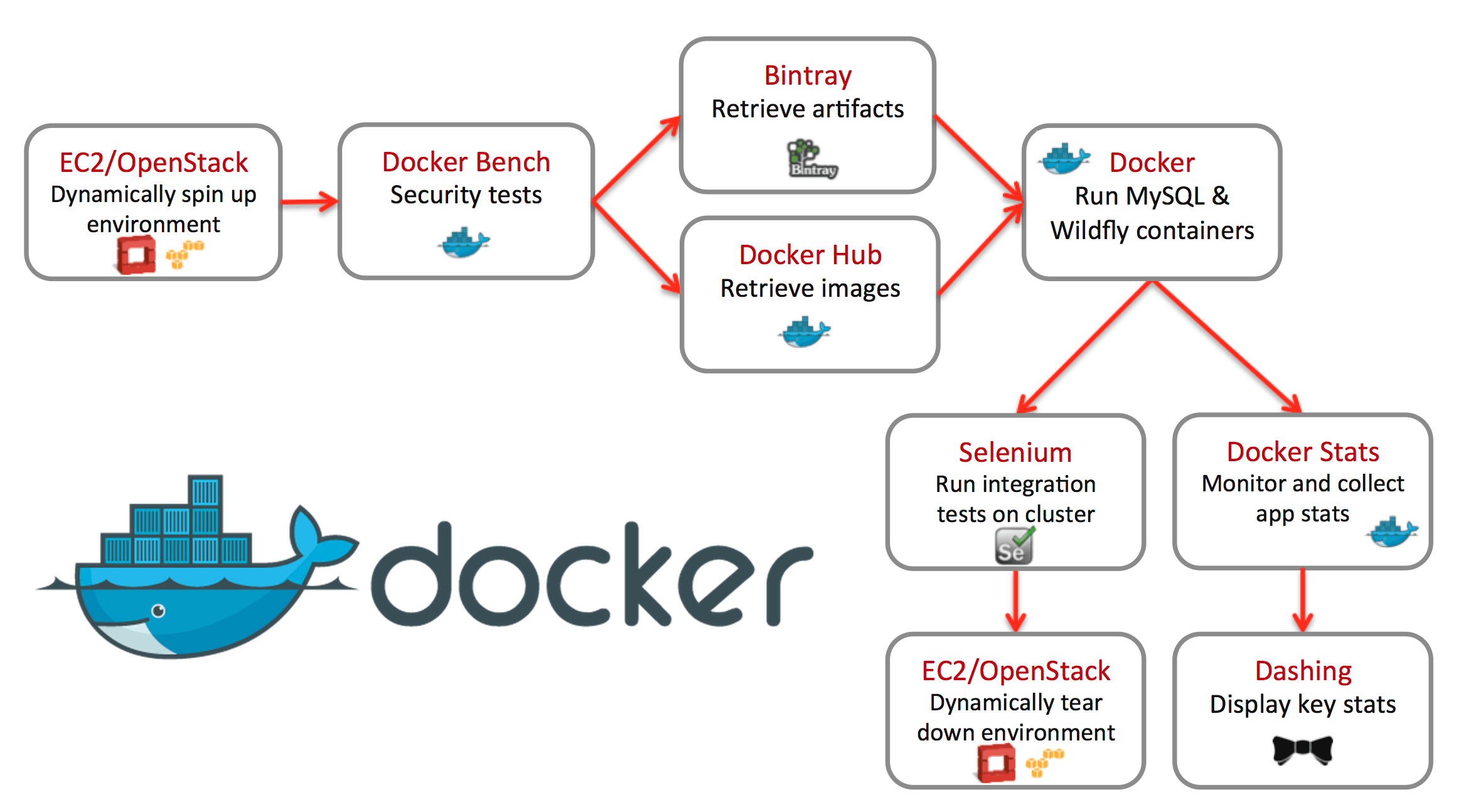
Normal pipeline flow:
The developer pushes code to the Git repository.
CI tools (like Jenkins or GitHub Actions) start up automatically.
The Docker image is created
The registry is where the image is stored.
The Kubernetes cluster or server is put into use.
Docker makes deployments consistent across environments by packaging everything inside the image.
No more problems with “dependency missing.”
Actual Use Cases in the Industry
Docker is frequently utilized in:
Platforms for online commerce
Applications for banking
SaaS goods
Systems of healthcare
Platforms for EdTech
Docker makes cloud migration and scaling easier, which is why even small startups favor it.
Nearly all applications in cloud-native businesses operate inside containers.
Difficulties in Acquiring Knowledge of Docker
Despite Docker’s apparent simplicity, novices may encounter certain difficulties:
Comprehending the principles of networking
Controlling persistent storage and volumes
Troubleshooting container crashes
Making the image size as small as possible
Creating effective Dockerfiles
Practice and practical projects help to make these difficulties manageable.
Building and running containers is a better way to learn Docker than merely reading about it.
Docker’s future in DevOps
Containerization is a long-term phenomenon. It is now an essential component of contemporary software architecture.
As businesses embrace:
Kubernetes
Containers without servers
Infrastructure for hybrid clouds
Applications that are cloud-native
Knowledge of Docker will remain useful.
Container basics will be crucial even if tools change.
Concluding remarks
Docker revolutionized the development and deployment of applications. It enables teams to concentrate on what really matters—creating dependable software more quickly—by eliminating environment-related problems.
Knowing Docker is not only helpful, but necessary for anyone aspiring to work in DevOps.